Short answer
Not an outside one. McKinsey's Solve rules forbid applications, websites, AI tools and pre-prepared notes, and its assessment integrity page adds "a calculator" to that list. That rules out Excel and calculator apps. Pen and blank paper are fine, and candidates report that the Redrock game has its own on-screen calculator.
Key takeaways
- McKinsey's Solve page and August 2025 FAQ forbid applications, websites, AI tools and pre-prepared notes. Excel and phone or desktop calculator apps are applications, so they are out.
- McKinsey's Assessment Integrity Expectations page, which covers any assessment, lists "a calculator" among banned items and asks for pen and paper only. Treat a handheld calculator as not allowed unless your invitation says otherwise.
- Candidates report a built-in calculator in Redrock. Pair it with fast mental estimates so you catch keying errors, and use paper for notes.
In this article

Part ofWhat Is McKinsey Solve? A Guide to Redrock, Sea Wolf and SFL
Search this question and you get opposite answers. One CaseBasix page says McKinsey allows "basic tools like Excel or calculators". Another CaseBasix page says "no external programs, spreadsheets, or calculators are allowed". McKinsey has published its own rules, so you don't need to guess. This page quotes them, dates them and turns them into a checklist.
- things McKinsey bans in Solve: applications, websites, AI tools, prepared notes
- 4
- Source: mckinsey.com
What does McKinsey's FAQ say about tools?
McKinsey's Solve page and its August 2025 Solve FAQ say the same thing. Unless McKinsey approves a disability accommodation in writing, "you are not permitted to":
- "Use applications, websites, AI tools, or pre-prepared notes"
- "Record or capture screenshots of any part of the assessment"
McKinsey also expects you to take Solve alone. It says a breach "may result in exclusion from consideration, rescinding of an offer, restrictions on future applications, or legal action."
The Solve page never uses the word "calculator". McKinsey's separate Assessment Integrity Expectations page does. It applies to "any assessment or interview" and asks you to refrain from "using any applications or websites, generative AI, a calculator, or prepared notes". The current version also asks you to "use only pen and paper for notetaking and calculations" and to use one screen.
Why do some guides say Excel is allowed?
The rules changed over time, and many guides were never updated. Here is what each McKinsey document says, oldest first:
| McKinsey document | What it says about tools |
|---|---|
| Problem Solving Game FAQ v2 (PSG era, 70-minute game) | No tool rules. Says no preparation is needed |
| Solve FAQs, 2024 | No tool rules. Deters cheating with varied scenarios and possible follow-up tasks |
| Integrity Expectations, archived April 2025 | Use one screen. Refrain from applications, websites, generative AI, "a calculator" or prepared notes |
| Solve FAQs, August 2025, and the Solve page | Not permitted: applications, websites, AI tools, pre-prepared notes, screenshots |
| Integrity Expectations, current | Adds "use only pen and paper" for notes and calculations, and "without overlays" to the one-screen rule |
Some prep sites also mention a post-game survey that reportedly asks whether you used Excel, a calculator or paper (MConsultingPrep). MConsultingPrep says the survey is not used in screening. Either way, a survey question is not permission.
Calculator, Excel or scratch paper: which is allowed?
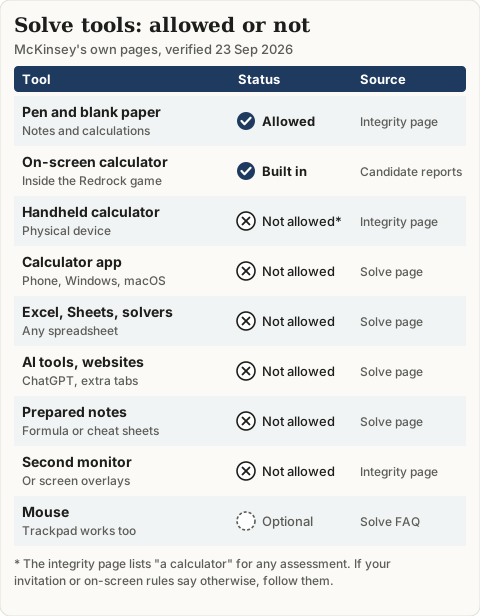
| Tool | Status | Why |
|---|---|---|
| Pen and blank paper | Allowed | Integrity page: "use only pen and paper for notetaking and calculations" |
| Redrock's on-screen calculator | Built into the game | Reported by candidates and prep sites, not described by McKinsey |
| Handheld calculator | Not allowed, unless your invitation says so | Integrity page lists "a calculator" |
| Calculator app on phone or computer | Not allowed | It is an application |
| Excel, Google Sheets, solver files | Not allowed | Applications. A pre-built solver also counts as prepared notes |
| ChatGPT or other AI, a second browser tab | Not allowed | Named on the Solve page |
| A formula sheet written before the test | Not allowed | Pre-prepared notes |
Decision rule: if a tool runs on a device, or holds something you wrote before the test, don't use it. If your invitation or the on-screen instructions explicitly permit something, those instructions win for your sitting.
On the built-in calculator, MConsultingPrep reports that it logs every result without rounding, and that you can drag results into answer boxes or the research journal. McKinsey does not say whether it tracks how you use these tools. The practical case is simpler: dragging an unrounded result avoids the rounding drift you get from retyping numbers.
What are the Solve system requirements?
McKinsey's FAQ is short on hardware detail. It says a tech check runs when you open your link, sound is not needed, a mouse is optional, and the test works only on a PC or Mac. It does not publish browser or bandwidth minimums, so third-party figures like "10 Mbps" are estimates.
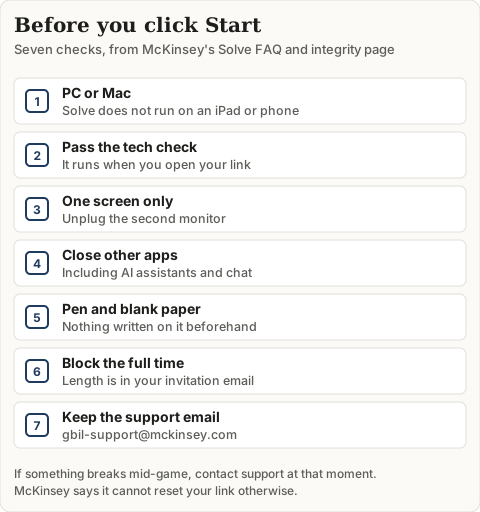
Three details catch people out:
- Timing lives in your invitation. McKinsey says the length of your Solve is stated in your invitation email. Candidates report 65-minute and 85-minute versions. See which invitation includes the Sustainable Futures Lab.
- Tutorials are untimed. Each game opens with a tutorial that isn't timed. Use it to find the calculator and journal before the clock starts.
- Report problems immediately. Tech issues go to gbil-support@mckinsey.com by email or live chat. McKinsey says it cannot reset your link if you don't contact support when the issue happens.
What mental math should you still practice?
Allowed tools don't make speed optional. Road to Offer puts Redrock at about 35 minutes and Sea Wolf at about 30; MConsultingPrep gives Redrock 30. Every calculator keystroke costs time, and one mistyped digit costs points. Estimate first, then confirm on screen.
Percentage change (Redrock style). A population falls from 2,400 to 1,980. The drop is 420. Ten percent of 2,400 is 240, 5% is 120 and 2.5% is 60, which adds up to 420. So the answer is a 17.5% decline, found without a keystroke. If the calculator shows 21.2%, you divided by 1,980 instead of 2,400.
Averages (Sea Wolf style). A site needs the average of your 3 microbes on one attribute to fall between 4 and 6. Convert the average to a sum, 12 to 18, and add as you pick. Values of 3, 7 and 5 sum to 15, which passes, even though 3 and 7 are each out of range on their own. The Sea Wolf averaging rule walks through the full method.
Fractions to memorize: 1/8 = 12.5%, 1/6 ≈ 16.7%, 1/7 ≈ 14.3%, 3/8 = 37.5%, 1/12 ≈ 8.3%.
The DrillCase math drills cover percentage, growth and ratio questions at timed pace, with 500 math questions in the bank.
For the full format and the other games, start with the McKinsey Solve guide, or rehearse the games on the Solve practice page.
Frequently asked questions
Can you use Excel during McKinsey Solve?
No. McKinsey's Solve page and its August 2025 Solve FAQ say you may not use applications, websites, AI tools or pre-prepared notes unless McKinsey approves an accommodation in writing. Excel, Google Sheets and pre-built solver files all fall under that rule. Guides that still call Excel allowed contradict McKinsey's current wording.
Is scratch paper allowed on McKinsey Solve?
Yes. McKinsey's Assessment Integrity Expectations page asks candidates to use only pen and paper for notes and calculations, and to throw away those notes afterward. Start with blank sheets. Formulas or strategies you wrote out in advance count as pre-prepared notes, and those are banned.
Does McKinsey Solve have a built-in calculator?
Candidates and prep providers report that Redrock includes an on-screen calculator and a research journal. They say the calculator keeps unrounded results that you can drag into answer boxes. McKinsey does not describe the calculator in its public FAQ, so check the untimed tutorial at the start of each game.
Can you take McKinsey Solve on a tablet?
No. McKinsey's Solve FAQ says the assessment is only available on a PC or Mac, so iPads and phones will not work. A tech check runs when you open your link and tells you whether your device meets the minimum specification. Sound is not needed and a mouse is optional.
Can I bring a handheld calculator to Solve?
Plan not to. The Solve-specific rules do not name calculators, but McKinsey's Assessment Integrity Expectations page covers any assessment or interview and lists "a calculator" among the things to refrain from using. If your invitation or the on-screen rules explicitly allow one, follow them. Otherwise, use paper and the in-game tools.
What happens if I break the tool rules?
McKinsey says a breach may lead to exclusion from consideration, a rescinded offer, restrictions on future applications or legal action. It also says it may ask you, at random, to take an extra task in person or explain your logic, so answers you cannot reproduce by hand are a real risk.
Sources
- McKinsey & Company: Solve, McKinsey's assessment game
- McKinsey & Company: Assessment Integrity Expectations
- McKinsey & Company: Solve FAQs (August 2025 PDF)
- McKinsey & Company: Solve FAQs (2024 PDF)
- McKinsey & Company: Problem Solving Game FAQs (v2 PDF)
- Internet Archive: Assessment Integrity Expectations, capture of 21 April 2025
- MConsultingPrep: McKinsey Solve Redrock deep dive
- MConsultingPrep: McKinsey Solve overview
- Road to Offer: McKinsey Solve assessment guide
- CaseBasix: McKinsey Solve tips
- CaseBasix: McKinsey Solve system requirements