Short answer
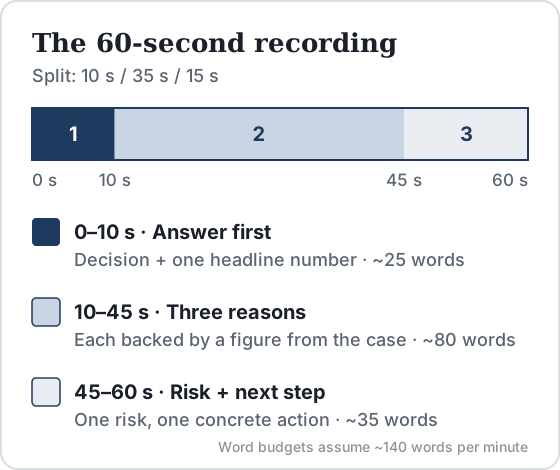
After Casey's chatbot questions, candidates report getting about 60 seconds to prepare and 60 seconds to record a spoken recommendation to the client, usually in one attempt. Use a 10/35/15-second script: give the decision and one headline number, then three reasons backed by case figures, then one risk and a next step.
Key takeaways
- Prep sites agree on the format: about 60 seconds to prepare, a 60-second recording, and a hard cutoff when time runs out. They disagree on whether you get one attempt or two, so plan for one.
- Say the decision in your first sentence. Spend about 35 seconds on three distinct reasons, each with a number from the case, and the last 15 on one risk and a concrete next step.
- At a normal speaking pace of 120 to 150 words a minute, 60 seconds holds 120 to 150 words. Aim for roughly 115 so you finish before the cutoff.
In this article
- What happens in the Casey video question?
- What do BCG assessors look for?
- How do you structure a 60-second recommendation?
- 0–10 s: answer first
- 10–45 s: three reasons with numbers
- 45–60 s: risk and next steps
- What does a strong Casey recommendation sound like?
- Strong (116 words, about 54 s at 130 wpm)
- Average (about 60 s, clipped)
- Weak (cut off before the answer)
- How do you score your own practice video?
- How should you deliver it on camera?
- How should you practice the Casey video?
Part ofBCG Casey Online Case: The Complete Guide
The video recommendation is the last task in BCG's online case, and the only one where you speak. You spend about 25 to 30 minutes on Casey's chatbot questions. Then you get one minute to prepare and one minute to turn that work into a spoken answer to the client. This guide covers the format, what the video is judged on, a timed script, three sample answers for one practice case, and a rubric to score your own recordings. For the full test, from the dataset question to results, see our BCG online case guide.
- attempt, per the latest reports (earlier versions reportedly allowed 2)
- 1
- Source: hackingthecaseinterview.com
- chatbot questions before the video, in most reports (some say 6–8)
- 8–10
- Source: hackingthecaseinterview.com
What happens in the Casey video question?
When the chatbot section ends, Casey asks you to record your final recommendation for the case on your webcam. BCG does not publish the specifications. The consensus below comes from prep sites that collect candidate reports:
| Element | What candidates report | Source |
|---|---|---|
| Timing | Separate from the chatbot's 25–30 minutes | MConsultingPrep, Hacking the Case Interview (HTCI) |
| Preparation | About 60 seconds before recording starts | MConsultingPrep, Prepmatter, HTCI |
| Recording | 60 seconds, then the recording stops, even mid-sentence | MConsultingPrep, HTCI, Road to Offer |
| Attempts | One, according to HTCI, Prepmatter and CaseBasix; "about two", according to StrategyCase | See the callout below |
| Task | Recommend a course of action to the client, based on the case you just solved | CaseBasix, HTCI |
What do BCG assessors look for?
BCG has not published a rubric for the video. Two things point to what matters. The first is BCG's own case-interview advice, which lists "think structurally", "communicate clearly" and "clarify assumptions" as the habits it wants to see (BCG Careers). The second is what prep sites infer from candidate reports. Prepmatter lists four criteria: a clear yes, no or conditional decision stated up front; two or three supporting reasons; confident, well-paced delivery; and a client-appropriate tone.
In practice you are judged on synthesis, not on recall. Summarizing what you did ("first we looked at the market, then we calculated...") is a common mistake. The assessor wants to know what the client should do and why. That is the pyramid principle: one governing point, with the supporting ideas grouped under it.
Nobody outside BCG knows whether a person, an AI or both assess the video. HTCI reports that BCG may use AI analysis alongside or instead of human review, but that is unconfirmed. A structure that works for both readers is a spoken answer that still makes sense as a plain transcript.
How do you structure a 60-second recommendation?
HTCI suggests the split used here: 10 seconds for the recommendation, 35 for three reasons and 15 for next steps or risks. Road to Offer and Prepmatter use close variants. What matters more than the exact split is how many words you can fit into it.
At the roughly 150 words a minute of ordinary conversation (National Center for Voice and Speech, via VirtualSpeech), 60 seconds holds about 150 words. A clarity-focused pace of about 140 words a minute (Baruch College, CUNY) gives you about 140. CaseBasix suggests 120 to 150 words. Nerves speed most people up, so draft about 115 words and let the extra seconds absorb pauses.
0–10 s: answer first
Say the decision and the one number that justifies it: "Northline should launch the airport shuttle. It pays back the $1.5 million investment in under three years." Do not open with "Hello, thank you" or background. If you want a greeting, keep it to three words ("Good morning, Northline").
10–45 s: three reasons with numbers
Signpost ("Three reasons"), then give each reason in one or two sentences with a figure you calculated or read in the case. The reasons should be MECE, meaning they don't overlap and together cover the case. Demand, profit and downside work because each answers a different question. Two reasons that are really the same point ("revenue is high" and "sales are strong") waste 12 seconds.
45–60 s: risk and next steps
Name the single biggest risk, then a concrete action that reduces it or tests it. Specific beats generic: "Sign a three-year contract and test two departure times" beats "we should monitor the market". If the cutoff hits here, you lose the least valuable part.
What does a strong Casey recommendation sound like?
Practice case (hypothetical). Northline Coaches, a regional bus operator, asks whether to launch an airport shuttle. The chatbot section established these figures: 1.2 million airport passengers a year from the region; an expected 8% share, or 96,000 trips; an $18 fare, giving $1.73 million in revenue; $1.2 million in annual operating cost; a $1.5 million upfront investment; and a planned rail link that opens in three years.
Strong (116 words, about 54 s at 130 wpm)
Northline should launch the airport shuttle. It pays back the $1.5 million investment in under three years. Three reasons. First, demand: an 8% share of the region's 1.2 million airport passengers is about 96,000 trips a year, or $1.7 million in revenue at $18 a ticket. Second, profit: operating costs are $1.2 million, so the route adds roughly half a million a year. Third, the downside is limited: we break even at a 5.6% share, well below our 8% base case. The main risk is the rail link planned to open in three years, which could take share. So I'd sign a three-year terminal contract, not five, and test two departure times in the first quarter.
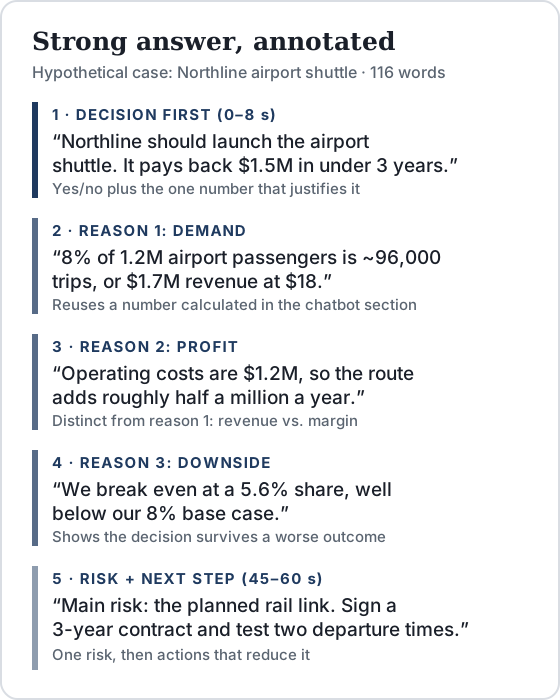
The math checks out: $1.2M ÷ $18 = 66,700 trips, which is 5.6% of 1.2M. The payback is $1.5M ÷ about $0.53M, or 2.8 years.
Average (about 60 s, clipped)
I think Northline should probably go ahead with the shuttle. The market looks attractive and there's a lot of demand from airport passengers. The numbers are positive and the profit seems good. There are some risks, like competition from rail, so they should be careful. Next steps would be to do more analysis on pricing and look at the...
Why it's average: it leads with the decision, but hedges it twice ("I think", "probably"). It uses no case figures, so it could describe any case. The reasons overlap: "attractive market" and "a lot of demand" are the same point. The next step is generic, and the cutoff lands mid-sentence.
Weak (cut off before the answer)
So in this case we started by selecting the datasets on market size and costs. Then we calculated the demand, which was 96,000 trips, and the revenue, which came to about 1.7 million. After that we looked at the operating costs of 1.2 million and the break-even share. We also considered the rail link. So overall, based on all of this, I would say that...
Why it's weak: it narrates the process in order, so the recommendation never arrives. The numbers are right but support no claim. The answer-first 10/35/15 structure exists to prevent exactly this.
How do you score your own practice video?
This is DrillCase's practice rubric, not BCG's. Record, transcribe (your phone's dictation is enough) and score each line 0, 1 or 2.
| Criterion | 2 points | 1 point | 0 points |
|---|---|---|---|
| Decision first | In the first sentence, unhedged | In the first 15 s, or hedged | Later, or never |
| Evidence | 3 or more case numbers | 1–2 numbers | None |
| Distinct reasons | 3 non-overlapping reasons | 2, or 3 that overlap | 1, or a process recap |
| Risk + next step | Both, and specific | One, or generic | Neither |
| Time and delivery | Done by 55 s, 3 or fewer fillers | 55–60 s, or 4–6 fillers | Cut off, or 7+ fillers |
A score of 8 or more is ready. With 6 or 7, fix the lowest line first. Below 6, drill the first sentence on its own until it comes out in under 10 seconds.
How should you deliver it on camera?
- Camera: at eye level, with your face lit from the front. Look at the lens, not the preview.
- Notes: three numbers and one keyword per reason on paper. Prep sites advise working on paper throughout the case, but reading a full script sounds flat on camera.
- Pace: slow down at the decision and the numbers, and pause briefly between reasons.
- Setup: do a test recording with the same webcam, browser and room before test day. Candidates report no pause option once the case starts.
- Integrity: use only what your invitation allows. BCG's guidance on AI in applications asks for "genuine human insight, not machine-generated output" (BCG Careers). Rehearse with scripts and timers beforehand, never during the live assessment.
How should you practice the Casey video?
The video only works if you have a case to summarize, so practice it at the end of a full chatbot case rather than on its own. Run a Casey-style case, then set a phone timer: 60 seconds to prepare, 60 to record. Transcribe the recording and score it against the rubric above. HTCI recommends at least five practice recordings before test day. Road to Offer's two-week plan goes further, with two days of five or more recordings a day.
DrillCase has 25+ Casey-style chatbot cases, one of them a free demo. Each gives you a finished case to turn into a recommendation. See them on the BCG Casey practice page or browse the case list. If your invitation names a different test, read Casey vs the BCG CCA first. For how chatbot cases differ from live ones, see the chatbot case format breakdown.
Frequently asked questions
Can you re-record the BCG Casey video?
Probably not. Hacking the Case Interview, Prepmatter and CaseBasix all report a single attempt with no re-record, and Hacking the Case Interview says earlier versions allowed two. StrategyCase still reports about two attempts. BCG publishes no official rule, so prepare as if the first take is final, and follow whatever your invitation says.
Can you read from notes during the Casey video?
BCG publishes no rule on this for the video. Prep sites such as Hacking the Case Interview and StrategyCase advise keeping pen and paper at hand for the whole online case. A few keywords and numbers on paper are fine to glance at. Reading a full script breaks eye contact and makes you sound flat. Never use an AI tool, teleprompter app or anything else your invitation does not allow.
What happens if you run over 60 seconds?
Candidates report a hard cutoff (MConsultingPrep, Hacking the Case Interview): the recording stops at the limit, even mid-sentence. That is why the script puts the decision first. If you are cut off during your next steps, the assessor has still heard your answer and your reasons.
Is the Casey video scored by AI or by a person?
Nobody outside BCG knows. BCG does not publish how the video is assessed. Hacking the Case Interview says that, based on candidate reports, BCG may use AI in addition to or instead of human review, but that is unconfirmed. Prepare for both: clear structure and specific numbers read well to a person and survive a transcript.
How many words fit in the 60-second Casey video?
Conversation runs at 120 to 150 words per minute, so 60 seconds holds 120 to 150 words. Nerves tend to speed you up, so draft around 115 words. The strong sample in this article is 116 words and takes about 54 seconds at 130 words per minute.
Does every BCG online case include the video?
Not necessarily. CaseBasix reports two versions of the final summary question: a one-minute video, or a written answer of three to four sentences typed into the chat. Road to Offer writes 'if your version includes the video', and MyConsultingCoach notes that BCG runs different assessments in different offices. Check your invitation, and ask your recruiter if it is unclear.
Sources
- Hacking the Case Interview: BCG Online Case, the complete guide (updated March 2026)
- Hacking the Case Interview: BCG Casey, how to prepare and pass
- MConsultingPrep: BCG Online Case chatbot guide
- Prepmatter: BCG Online Case assessment, questions and format
- StrategyCase: The complete guide to the BCG Online Case (updated July 2026)
- Road to Offer: BCG Online Case (Casey) format, questions and prep
- CaseBasix: BCG Casey summary question guide
- MyConsultingCoach: BCG online assessment, which test did you receive?
- BCG Careers: Case interview preparation
- BCG Careers: How to use AI in your application process
- Barbara Minto: The Minto Pyramid Principle
- VirtualSpeech: Average speaking rate and words per minute (citing the National Center for Voice and Speech)
- Baruch College (CUNY), Tools for Clear Speech: Speaking rate