Short answer
BCG Casey is the chatbot-led online case BCG calls the Online Case Experience. BCG says it takes about 30 minutes. Candidates report one business case with 8 to 10 questions, opening with dataset selection, answered one at a time with no going back, and ending with a 60-second video recommendation. A calculator is reportedly allowed.
Key takeaways
- Casey is a timed screen, not a conversation: the chatbot sets each step and you cannot ask clarifying questions.
- Candidates describe six question types: dataset selection, structuring, calculation, chart reading, business judgement and the video recommendation.
- Answers are final once submitted, so practice with a clock and commit to each answer before moving on.
In this article
Part ofBCG Casey Online Case: The Complete Guide
BCG Casey is the chatbot that runs BCG's online case, which BCG calls the Online Case Experience. Instead of talking a case through with a consultant, you work through one business problem with a chatbot that asks for choices, calculations, chart readings and short written answers, one step at a time. This article walks through the format screen by screen. For scoring, pass rates and a full prep plan, see the BCG online case guide.
What happens in a Casey session
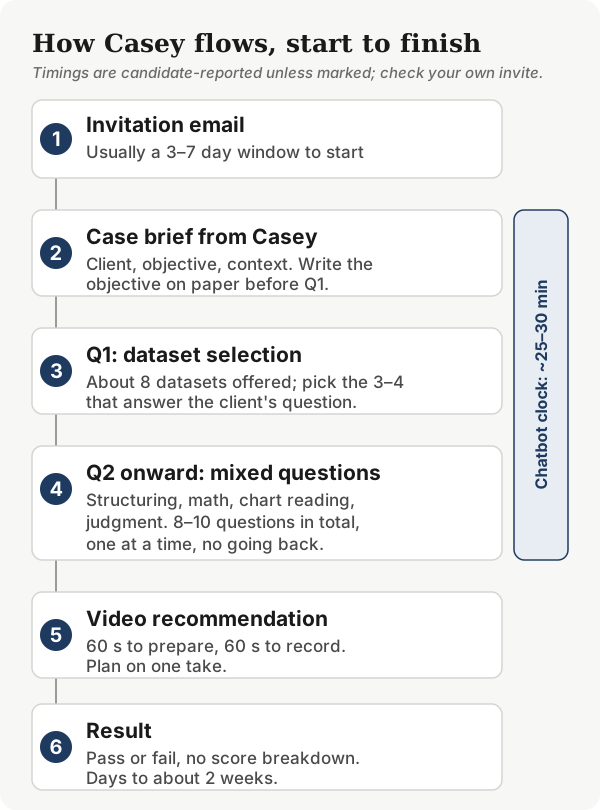
- Invitation. An email with a link and a deadline, reported at about 3 to 7 days.
- Case brief. Casey introduces the client and the objective. The chat sits on one side of the screen and exhibits on the other.
- Dataset selection. The first question usually asks which data you would request, choosing a few sources from a list of about 8.
- Mixed questions. Structuring, calculations, chart reading and judgement calls, one at a time, with no going back.
- Video recommendation. Most sources report 60 seconds to prepare and 60 seconds to record a recommendation on your webcam.
- Result. Pass or fail, reportedly within a few days to about two weeks, without a score breakdown.
The six question types
| Question type | Typical format (reported) | What it tests | Practice with |
|---|---|---|---|
| Dataset selection | Pick 3 or 4 of about 8 datasets | Hypothesis-driven scoping | Dataset selection guide |
| Structuring | Multi-select or a short written list | MECE thinking and breadth | Free case library |
| Calculation | Numeric entry | Setting up the math correctly | Math drills |
| Chart and exhibit reading | Single-select, sometimes 2 or 3 exhibits combined | Pulling the right number fast | Chart drills |
| Business judgement | Single- or multi-select | Choosing the conclusion the data supports | Casey-style cases |
| Video recommendation | 60-second recording | Synthesis and delivery | Video script guide |
Hacking the Case Interview estimates quantitative work at roughly 60 to 70 percent of the test, citing candidate reports. If time is short, spend most of it on timed numbers and exhibits.
Reading exhibits without mistakes
Most lost points on exhibit questions come from misreading, not from hard math: the wrong axis, percentages taken for absolute numbers, or a footnote that changes the meaning. Read the axes, then the units, then only the series the question names.
Judgement questions
Several options often look partly right. Eliminate any option that goes beyond what the data shows, then choose the one that answers the client's objective. Casey tests whether the data supports your conclusion, not your business instinct.
Format rules at a glance
| Parameter | What candidates report |
|---|---|
| Cases | One business case |
| Questions | 8 to 10, starting with dataset selection |
| Total time | About 30 minutes (BCG), plus the video |
| Going back | Not possible once submitted |
| Calculator | Reportedly allowed; follow your invitation |
| Exhibits | Charts and tables beside the chat |
| Ending | 60-second video recommendation |
How Casey is scored
BCG has not published a scoring method. Multiple-choice and numeric answers are presumably marked automatically. Prep sites disagree on negative marking and on whether the video is analyzed automatically, and our Casey guide lays out who says what. The practical rule: answer every question, and treat every written or spoken answer as if a consultant will read it.
Five mistakes that trip candidates up
- Treating it like a case interview. Frameworks help, but Casey adds a clock and takes away the conversation.
- Practicing without a timer. Candidates who practice untimed are often surprised by how little time each step allows.
- Rushing the exhibits. The exhibit contains the answer. Skimming it is where most misreads happen.
- Second-guessing. You cannot go back, so dwelling on the last answer only costs time on the next one.
- Skipping math practice. The math is simple; the speed is not. Short daily drills fix this.
How to practice the format
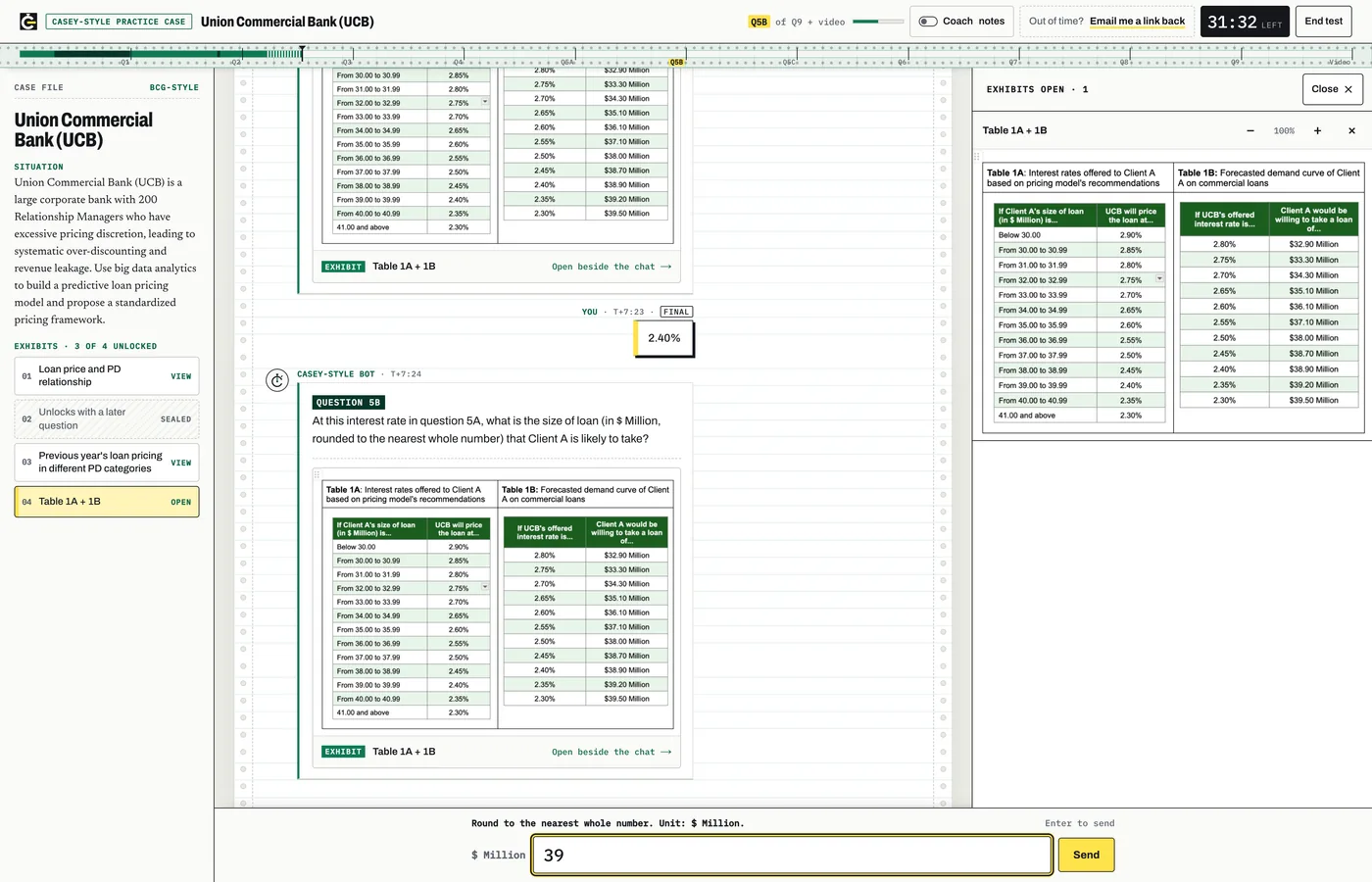
DrillCase has 25+ BCG Casey-style chatbot cases with 250+ questions: a chat panel, exhibits you open as you go and a running clock. One case is free to try. They are practice material, not BCG's test. Pair them with the free math drills, chart drills and the 63-case library.
Frequently asked questions
How many questions are in the BCG Casey assessment?
Candidates report one business case with 8 to 10 questions, opening with a dataset-selection question and ending with a short recorded video recommendation. BCG itself says only that the online case takes about 30 minutes and is guided by a chatbot. Question counts vary by office and version, so treat 8 to 10 as a planning range.
Can you go back to previous questions in BCG Casey?
No, according to candidate reports and prep sites. Once you submit an answer, the chatbot moves on and you cannot return to it. Each answer is final, so read the objective carefully at the start and commit to an answer rather than dwelling on uncertainty.
Is BCG Casey the same as a case interview?
No. Casey is a screening test in which a chatbot sets each step, shows the exhibit you need and waits for your answer. You cannot ask clarifying questions or steer the analysis. BCG's own prep advice is that preparation is the same as for a case interview, but the format adds a clock and a no-going-back rule.
How long does the BCG Casey assessment take?
BCG says about 30 minutes. Candidates add a short video section at the end, usually reported as 60 seconds to prepare and 60 seconds to record. The invitation window to complete it is reported at about 3 to 7 days, so check the deadline as soon as the email arrives.
Can you use a calculator in BCG Casey?
Candidates and most prep sites report that a calculator is allowed. BCG has not published a Casey-specific rule, and other BCG tests such as the German cognitive test ban calculators, so follow your invitation. Mental math is still faster for simple steps.
Practice what you just read
Rehearse the chatbot case in the same kind of screen
Reading about Casey helps. Answering a timed question while an exhibit sits next to the chat is what builds the habit. Each DrillCase case runs in a chat panel with exhibits you open as you go and a clock that keeps running.
- chatbot-style cases
- 29
- case questions
- 275
- free demo case
- 1
- 29 cases and 275 questions: calculations, chart reading, data choices and written answers
- Exhibits open beside the chat, as in the format candidates describe
- Start with the free demo case, then buy 14 or 20 cases, or all 29 with the All-Access Pass
Complete refunds within 7 days if you have opened no more than 3 cases (the free demo case included). Starter is final sale, so try the free demo case first. All-Access has a 7-day money-back guarantee. Refund policy. DrillCase is independent practice material and is not affiliated with McKinsey, BCG or Bain.
Sources
- BCG Careers, Mexico: Online Case Experience (OCE) description
- BCG Alumni: Enlisting technology to help companies with contactless hiring (Casey origin, 2020)
- Hacking the Case Interview: BCG Online Case, the complete guide
- StrategyCase: The complete guide to the BCG Online Case (Casey)
- Road to Offer: BCG Casey guide
- MyConsultingCoach: BCG Casey (OCE, HireQuotient) and online case prep
- Management Consulted: BCG Online Case